
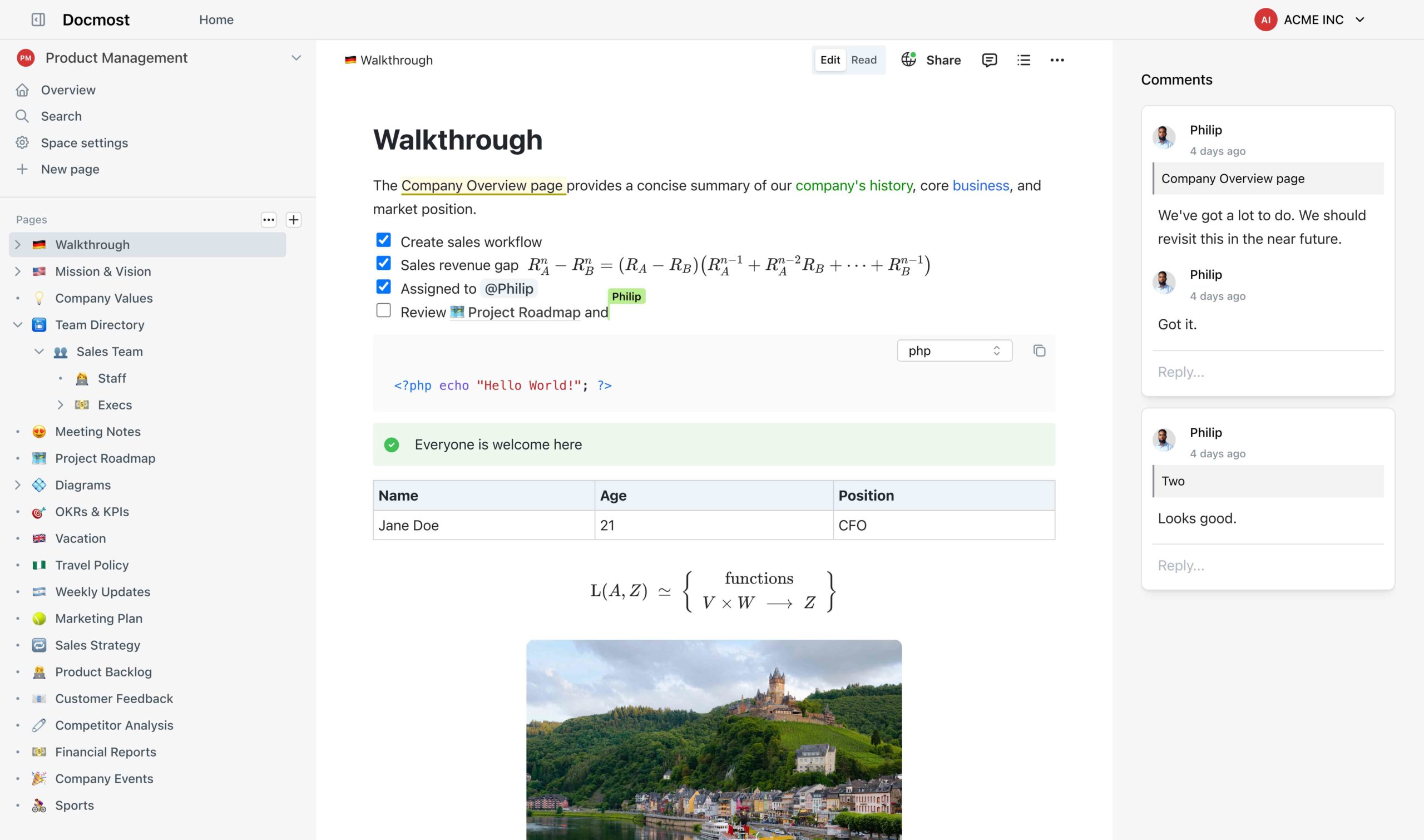
If your team is tired of paying per-seat SaaS bills for Confluence or locking your company knowledge into Notion’s proprietary ecosystem, it might be time to take a serious look at Docmost — a rising open-source project that’s quickly become one of the most compelling alternatives in the collaborative documentation space.
With over 20,000 GitHub stars and an active development team pushing regular commits, Docmost is no longer just a scrappy side project. It’s a production-ready knowledge management platform built for teams who want full control over their data without sacrificing the modern UX they’ve come to expect.
What Is Docmost?
Docmost is an open-source, self-hosted collaborative wiki and documentation platform founded by Philip Okugbe. Licensed under the AGPL-3.0 for its core, it is designed as a direct alternative to tools like Notion, Confluence, and Obsidian.
At its core, Docmost lets teams create, organize, and share knowledge in a structured, real-time environment — all while keeping that knowledge on infrastructure you control.
Key Features
Real-Time Collaborative Editor
The centerpiece of Docmost is its rich, real-time editor. Multiple team members can edit the same page simultaneously, with changes appearing instantly across all sessions. The editor supports:
- Rich text formatting
- Tables and nested pages
- LaTeX for mathematical notation
- Media embeds and file attachments
- Drag-and-drop from the clipboard (local and S3 storage supported)
Built-In Diagram Support
Documentation without diagrams is half a story. Docmost ships with native integrations for three of the most popular diagramming tools:
- Mermaid — code-based diagrams (flowcharts, sequence diagrams, ER diagrams)
- Draw.io — drag-and-drop visual diagramming
- Excalidraw — hand-drawn style collaborative whiteboards
No plugins, no add-ons — these are baked in.
Spaces for Organized Knowledge
Docmost introduces the concept of Spaces — dedicated sections for different teams, departments, or projects. Engineering, HR, Product, and Marketing can each maintain their own structured knowledge base within the same platform, with independent permissions and navigation.
Granular Permissions and Groups
Access control is a first-class citizen in Docmost. You can assign permissions at the individual user level or through Groups, making it easy to manage access at scale. The permissions system controls who can view, edit, or administer any piece of content.
Page History and Version Control
Every change is tracked. Docmost’s built-in page history lets you review previous versions of any document and roll back to an earlier state if needed — an essential feature for team-maintained wikis.
Full-Text Search
Powered by PostgreSQL’s native full-text search engine, Docmost lets you find information quickly across all pages and spaces. No third-party search infrastructure required.
Inline Comments
Teams can leave inline comments directly on any page to discuss content in context — reducing the need for back-and-forth in Slack or email about specific documentation.
Public Sharing
Need to share documentation externally? Docmost supports public sharing via links, making it easy to publish pages for partners, customers, or open-source communities without requiring them to create an account.
Tech Stack
For the technically curious, Docmost is built on a modern, well-chosen stack:
- Frontend: React + Vite, using Mantine UI components for a polished interface
- State Management: Jotai
- Backend: Node.js (TypeScript)
- Database: PostgreSQL (also used for full-text search)
- Caching / Real-Time: Redis
- Monorepo Management: NX
- Deployment: Docker (containerized stack rated low complexity — 2/5)
This is a clean, maintainable stack that any mid-sized engineering team can operate confidently. The containerized deployment means you can be up and running in minutes with Docker Compose.
Self-Hosted vs. Cloud
Docmost offers two deployment paths:
Self-Hosted (Open Source) Deploy Docmost on your own infrastructure using Docker. You own all the data, you control the environment, and your knowledge never touches a third-party server. This is the ideal choice for organizations with strict data residency, HIPAA, or GDPR requirements. When self-hosted, Docmost is HIPAA-eligible and ISO 27001-ready — though the shared-responsibility model means you are accountable for PostgreSQL encryption at rest and OS-level hardening.
Cloud (SaaS) For teams who prefer a managed experience, Docmost offers a hosted cloud version at docmost.com. Pricing starts at $5 per user per month (billed annually), competitive with or cheaper than most alternatives.
Pricing Breakdown
| Tier | Price | Highlights |
|---|---|---|
| Open Source (Self-Hosted) | Free | AGPL-3.0 core, full collaborative features |
| Cloud | $5/user/month (annual) | Managed hosting, same core features |
| Business / Enterprise | Custom | SSO (SAML 2.0, OIDC), SCIM, Audit Logs, advanced migrations |
One important note: enterprise-grade identity features like SSO and Audit Logs are restricted to paid Business and Enterprise tiers, housed in a proprietary /ee folder. This is the classic open-core model. For most small-to-mid-size teams, the free self-hosted tier is more than sufficient.
How Docmost Compares to Notion and Confluence
| Feature | Docmost | Notion | Confluence |
|---|---|---|---|
| Open Source | ✅ AGPL-3.0 | ❌ | ❌ |
| Self-Hosting | ✅ Docker | ❌ | ✅ (Data Center) |
| Real-Time Collaboration | ✅ | ✅ | ✅ |
| Built-In Diagrams | ✅ (Mermaid, Draw.io, Excalidraw) | ⚠️ Limited | ⚠️ Add-ons |
| Data Sovereignty | ✅ Full | ❌ | ⚠️ Partial |
| Free Self-Hosted Tier | ✅ | ❌ | ❌ |
| Starting Price (Cloud) | $5/user/month | $10/user/month | $5.75/user/month |
Who Should Use Docmost?
Docmost is a great fit for:
- Developer teams and startups who want a powerful wiki without the per-seat SaaS cost
- Privacy-conscious organizations that need to keep sensitive documentation on-premise
- Companies escaping Confluence who want a more modern, less clunky interface
- Open-source projects looking for a self-hosted knowledge base with public sharing capabilities
- Enterprises on a migration path who need Notion or Confluence importers (available in Business tier)
It may not be the best fit for teams that require enterprise SSO or SCIM provisioning without paying for the Business tier, or those without the infrastructure know-how to maintain a self-hosted Docker deployment.
Community and Development Velocity
The Docmost GitHub repository is actively maintained, with commits as recently as May 2026. The project has garnered over 1,300 forks and a community that provides feedback via GitHub Discussions. For a relatively young project, the development velocity is impressive — a strong indicator that it won’t be abandoned anytime soon.
Getting Started
Getting Docmost up and running is straightforward with Docker. A basic setup requires:
- A PostgreSQL database
- A Redis instance
- The Docmost Docker image
The official documentation at docmost.com/docs walks through the full setup, including environment variables, storage configuration (local or S3), and workspace initialization.
For Kubernetes enthusiasts, the project also maintains a public k8s repository with deployment manifests.
Final Verdict
Docmost is one of the most exciting open-source projects in the knowledge management space right now. It combines a genuinely polished user experience with the freedom and transparency of open source — a combination that’s far rarer than it should be.
Whether you’re a small team looking for an affordable Confluence replacement, a privacy-focused organization that needs on-premise documentation, or a developer who just wants to own their tools, Docmost deserves a serious look.
⭐ GitHub: github.com/docmost/docmost
🌐 Website: docmost.com
📄 License: AGPL-3.0 (Core) | Proprietary (Enterprise Edition)
Have you tried Docmost? Share your experience in the comments below.